How to Identify Scam Websites in 2026 (Step-by-Step Guide)
Published on: 26 March, 2026
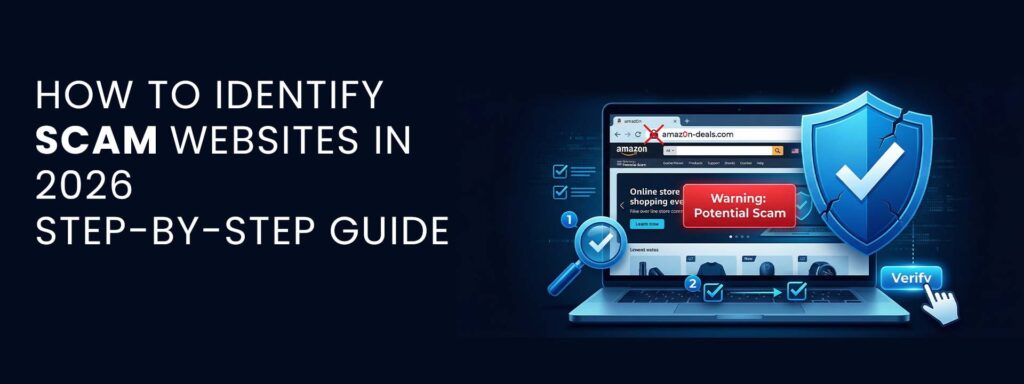
Right now, spotting scam website check matters a lot. Fake online spots pretend to be real so they can take your details, cash, or private info. They copy well-known shops, banks, or seo services in pakistan companies to trick people into trusting them. By 2026, fake sites will pop up faster than ever – AI builds content quickly, making scams look real.
Tools to launch a webpage cost almost nothing these days. Because of that, fakes slip through easier. Think fake shops selling items they never ship. Or copies of real website development company pages, nearly identical at first glance. Scam investments? They feel legit too, dressed up with details that sound convincing. Targeted messages help them land right where it hurts most.
One wrong click can cost a person their savings. Companies might survive the breach but not the shame that follows. Spotting danger signs online isn’t about tech skills – it’s common sense sharpened by habit. A shaky site doesn’t always look broken; sometimes it just feels off, like a door left open in winter. Knowing what check website trust the surface keeps both shoppers and stores safer.
Trust builds slowly. It vanishes fast. Start here if you want to test if a site is trustworthy. Every move matters when spotting fakes online. Follow these moves one at a time, without rushing. Spotting truth takes patience – notice how links appear, where they lead. Look closely at the address bar; small oddities hint at danger. Pages that feel off often are. Trust what your eyes catch before your brain explains it away.
Real websites authentication check, while shaky layouts whisper fraud. Compare images: sharpness counts. Fake ones blur or stretch. Errors in spelling? A red flag waves slowly. Click buttons gently – do they work or freeze? Wait for feedback after each tap. Hesitation from the page speaks volumes. Move forward only when sure. Doubt means stop. This method builds clarity slowly, like dawn.
Quick Answer – How to Identify a Scam Website
- Look closely at the web address. Spot any odd letters or wrong words.
- Check that the site uses HTTPS first. Yet a padlock symbol isn’t enough by itself
- Start by looking at how the site looks – check layout, colors, spacing.
- Verify contact details and business information
- Use tools like a fake website checker or review platforms
Wrong signs pile up when something’s off, not just one red flag alone. Though it seems safe, scams hide behind clean designs – scam check deeper anyway.
What is a Scam Website?
Definition of Scam Websites
Not what it seems – some websites pretend to be trustworthy just to grab your personal details or money. Behind the professional design? Nothing solid backing them up.
Types of Scam Websites in 2026
Phishing Websites
Faking bank messages, these scams copy real sites to grab your passwords. Pretending to be familiar services, they trick you into typing private details. Built like official alerts, they lure users with urgent requests. Acting just like your email provider, they wait for mistakes. Copying social media logins, they collect what you enter without warning.
Fake E-commerce Stores
Selling things way too cheap, yet vanishing before shipping ever happens.
Clone Business Websites
Fakes that mimic known names trick people into handing over cash. Instead of honest labels, these clones borrow trust they do not earn. Payment flows go straight to operators who vanish after the sale. Recognition becomes a weapon turned against buyers expecting safety. Investment and Cryptocurrency Fraud Fake promises of big gains – then gone after your cash goes in.
Why Scam Websites Are Increasing in 2026
Faster now, scam sites spread because of many reasons:
- These days fake sites pop up fast, built by scammers using artificial intelligence. One minute there’s nothing – next, a slick webpage appears out of nowhere.
- Launching several counterfeit sites takes almost nothing these days. A person might pick cheap hosting plus a bargain domain without effort.
- Clicks often land on fraud sites through phony posts online. Deceptive promotions pop up where people scroll daily.
- Some people aren’t sure how to verify website is real. Not everyone notices clues that show trustworthiness. A few skip steps that confirm safety online.
One way to look at it: schools might have to change how they teach. Not just that, people need sharper eyes online.
Step-by-Step Guide to Identify Scam Websites
Step 1 – Check the Website URL Carefully
Spot tiny mistakes like swapped letters or odd symbols. A site named amaz0n.com when it should be amazon.com? Big warning sign. Strange endings on web addresses often mean trouble. Watch for extra dots, numbers where they dont belong, or weird combos tacked onto familiar names. Something feels off, it probably is.
Step 2 – Look for HTTPS & Security Indicators
Just because a site uses HTTPS does not mean it’s safe. Scammers often add SSL just to seem honest. Security in the address bar hides nothing about intent. Fake pages look professional now. A lock symbol never promised truth. Trust needs more than encryption. Looks can fool. Safety online takes effort beyond clicks. Real harm wears clean design. Not every secured link leads somewhere real.
Step 3 – Analyze Website Design & Content
A solid graphic designing company in pakistan puts money into good design along with strong material. Be careful about:
- Poor UI/UX
- Broken images
- Grammar mistakes
- Copied or generic text
A clear signal something is wrong shows up here – either the real or fake website works fine but feels off, yet there’s often more beneath the surface than first thought.
Step 4 – Verify Contact Information
Check if the website provides:
- Real address
- Working phone number
- Professional email
Fake sites might toss out a vague email – or skip contact info completely.
Step 5 – Check Domain Age (WHOIS)
Check the domain’s creation date using a WHOIS lookup. Domains that were just set up tend to raise red flags. Often, fresh registrations aren’t trustworthy.
Step 6 – Search for Reviews Online
Use a website review checker to find:
- Customer complaints
- Scam reports
- Trust ratings
When there are no reviews, move forward carefully.
Step 7 – Check Payment Methods
Avoid websites that only accept:
- Cryptocurrency
- Gift cards
- Prepaid payments
Folks running real companies make sure payments are safe plus you can track them.
Tools to Check if a Website is Safe
- Keeps an eye out for sketchy sites, spotting risks right away through Google’s safety network.
- Finding threats online? VirusTotal checks links to catch malware, while spotting phishing attempts through deep inspection.
- A look into WHOIS reveals who registered a domain, along with their contact info. Ownership records show up clearly when you check through this tool.
These tools enhance your website checker real or fake, process, and improve decision-making. A different way to look at it: choices get sharper when this system works behind the scenes. One thing leads to another – the evaluation steps become clearer. Sometimes a tool does more than expected, shaping judgments without drawing attention. Hidden shifts happen during review stages, quietly refining outcomes.
Common Red Flags of Scam Websites
- Unrealistic offers (too good to be true)
- Only available for a short while uses pressure to push decisions
- No social media marketing agency proof or customer reviews
- Poor branding and inconsistent design
When several warning signs show up, step away from that site right then.
Real vs Fake Website – Key Differences Table
| Factor | Real Website | Scam Website |
| Domain Age | Older | New |
| Design | Professional | Low Quality |
| Contact Info | Verified | Missing |
| Payments | Secure | Risky |
How Scam Websites Affect Businesses
Fake sites hurt people, yet they hit real companies too.
- When fake versions appear, trust slips. Copycats blur the real picture
- One site copying another might mess with how engines judge reliability
- When trust breaks, people walk away. A single rough encounter makes someone think twice before clicking again
- Fake rivals steal shoppers. That missing traffic means less money coming in
A strong online footprint needs careful handling, so companies put effort into building sites that are safe and reliable. Not just flashy fronts, but spaces people can count on without worry – this matters more every day.
How to Build a Trustworthy Website (Expert Tips)
To avoid being mistaken for a scam website:
- Fortified by SSL, extra safeguards layer beneath. Security deepens when encryption leads the way
- Add verified reviews and trust badges
- Provide clear and accessible contact information
- Maintain a fast, professional website design
- What is SEO marketing? Meaning benefits and how it works
Progressive Solution helps businesses build secure, high-performance, and SEO-optimized websites that users can trust. From design to security, every element is crafted to enhance credibility.
Conclusion
Fake sites now look much like real ones, so telling them apart gets tougher every day. Spotting fakes means learning what details to pause on when browsing online. Staying alert helps. Spotting odd URLs might save you. Contact info that checks out adds confidence. A website’s look can tell a story.
Tools others rely on often catch what you miss. Fraud slips through when attention fades. Watch out at every step. Hesitate a moment before following links. Put checking site legitimacy first when navigating choices online.
FAQ’s
1. How do I check if a website is legit?
Check the URL, verify contact details, analyze design quality, and use tools like a fake website checker to confirm authenticity.
2. Can HTTPS websites still be fake?
Yes, HTTPS only secures data transmission. It does not guarantee that the website itself is trustworthy.
3. What is the safest way to verify a website?
Use a combination of manual checks and tools such as Google Safe Browsing and VirusTotal to perform a comprehensive website authentication check.
4. How do scam websites trick users?
They use fake branding, urgency tactics, emotional offers, and cloned designs to create a sense of trust and push users into quick decisions.
Recent Posts
- Top Digital Marketing Skills That Actually Make Money in 2026
- How to Check Search Visibility Using Google Search Console

- Marketing and Advertising Strategies That Actually Work in 2026

- How to Identify Scam Websites in 2026 (Step-by-Step Guide)

- What Is a Software Development Process Model? A Complete Guide by Progressive Solution